
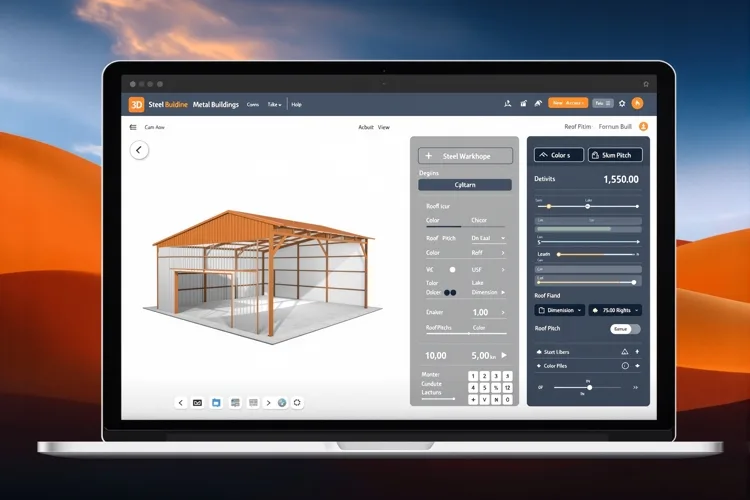
Design Your Metal Building in 3D With Our Free Chrome Extension
Part of our Metal Buildings guide.

I am Josh Lawrence, Division President at UTS BuildPros, and I have spent enough years watching people price a steel building the slow way — filling out a form, waiting for a call back, trading emails about dimensions and colors — to know there had to be a faster path. So we built one. The UTS BuildPros 3D Metal Building Designer is a free Chrome extension that puts a real-time 3D design tool one click away in your browser toolbar. You configure your dimensions, lean-tos, and roof pitches, watch the building update in real time, and send the finished model straight to our preconstruction team for a quote. No sign-up. No download. No sales call. Here is exactly how it works and why we built it.
Why We Built a Browser Extension Instead of Another Web Form
The traditional quote process has a problem that nobody in construction likes to admit: it makes you wait. You fill out a contact form describing what you think you want. Someone calls you back, usually at the wrong time. You trade emails. You schedule a call. Days pass before you see anything that looks like your building. For a commercial developer trying to pencil out a 2026 project, or a contractor juggling three bids, that lag is expensive. We wanted to collapse it to zero. A browser extension made sense because it lives where you already are — in Chrome, in the toolbar, always one click away. There is no new app to learn and nothing to install beyond the extension itself. You open it, design, and send. The whole loop takes minutes instead of days.
What You Can Design in Real-Time 3D
The designer covers the four structures our customers ask about most. Metal buildings — from a 30x40 workshop to a large commercial steel frame. Barndominiums — the steel shell with a residential finish that keeps growing in Texas and Oklahoma. Commercial steel structures — warehouses, distribution, and manufacturing shells with the clear spans and eave heights those uses demand. And workshops — the detached shop and garage projects that are our bread and butter. For each, you control the dimensions, the lean-tos, and the roof pitch, and you can adjust the color as you go. The model updates live, so what you see is what your quote reflects — not a rough sketch with a disclaimer attached.
How It Works: Three Steps From Click to Quote
Step one is installing the UTS BuildPros — 3D Metal Building Designer extension. It is free, and it takes about thirty seconds. Step two is configuring your building — set the width, length, and eave height, add lean-tos, and dial in the roof pitch and color. The 3D model rebuilds instantly as you change each value, so you can iterate without starting over. Step three is hitting Request Quote. That sends your 3D model directly to our preconstruction team, who review it and come back with a real, buildable number. You have not committed to anything by sending it — it is simply the fastest way to get an accurate quote in front of you.
Zero Sign-Up, Zero Download, Zero Sales Call
I want to be direct about what this extension is not, because the category is full of tools that bury the real cost behind a capture form. There is no account to create. We do not ask for your email, your phone number, or your company before you can use the tool. There is no software to download and install beyond the extension itself. And there is no mandatory sales call gating the quote — you design first, and you choose when and whether to talk to us. If you want to price three different configurations before you ever speak to a human, you can do exactly that.
Your Projects Stay on Your Machine
Privacy matters in construction, where a project can be competitive or confidential. The 3D Metal Building Designer stores your saved projects locally, in your browser toolbar — not on a server somewhere and not synced to a third party. That means your dimensions, configurations, and in-progress designs stay on your own machine until you choose to send them to us. We collect zero personal data to run the tool, and nothing leaves your browser unless you hit Request Quote yourself.
Why This Matters for 2026 Project Planning
Commercial real estate developers, contractors, and property owners are all staring down the same 2026 reality: costs are elevated, lead times are long, and the earlier you can lock a realistic number, the more options you have. A tool that lets you price a steel building in minutes — at 10 p.m., on a weekend, before you even call a contractor — changes how early you can start planning. It turns a quote from something you wait for into something you generate. That is the entire point. If you are planning a metal building, barndominium, commercial steel structure, or workshop in 2026, install the free extension and see your building before you buy it.
Install the UTS BuildPros — 3D Metal Building Designer today, and when you are ready to talk through the numbers, contact UTS BuildPros for a free consultation. We build metal buildings across Texas, Oklahoma, and Arkansas — and now you can design yours before you ever pick up the phone.
Related Service
Interested in metal building construction? Learn more about how UTS BuildPros can help.
Explore Metal Building ConstructionReady to Start Your Project?
Get a free consultation and detailed estimate from our veteran-owned construction team.